Friday, November 10, 2006

Learn Shallow and Deep Copy - In Minutes

Recently I was in a talking with my HOD, he was telling this example for "Shallow Copy" and "Deep Copy" in C++!

Consider, I went into the examination hall unprepared having full faith in Srihari (my friend) for my answers. Srihari is a gifted person, who prepared very well for the exam and sure to take the test in ease. I was sitting on the cross diagonal to him to miss the eyes of the invigilator and finish the job. Once the exam started Srihari was composing the answers in great flow. He was writing neatly and well spaced.

Me after hiding behind all the heads before me, stated to peep into his paper and copying the answers in a hurry. I didn't mind abt the hand writing and line spacing. Could read his paper once and spit them in my paper without finding out the real context of it. In the process I copied this line exactly as it is, "The architectural diagram is given in the Figure 2 of Page 10."

I state this particular line as a "pointer". Pointer to the figure in Page 2 of Srihari's paper. If I would have been lucky it should have been the same in my paper too. But it was not. In my paper it was in Page 4 Figure 1. Here comes the point...

If there hadn't been a pointer line like this, then the copying I made is referred as a shallow copy. Else with the pointer, I should make it to refer the correct figure in my paper. This is Deep Copying. When ever we have a pointer in the class and make it reference to the new location.

Wednesday, June 21, 2006

Modular Application Development

In the earlier days, programs were primarily structured. The spagetti code style of old Fortran and Basic were replaced by the structured programming style of C language. But this didn't solve all the problems of the programmers. As the code got bigger, writing code and maintaining the code also became very difficult. Imagine a single C file containing tens of thousands of code with thousands of function modules! Perhaps, it needs a few people to be assigned explicitly to maintain the code alone! Well, then came the Object Oriented Programming style. This proved to be a great solution to maintain the complexity of the coding and code maintanence.

Thousands of functions were split into thousands of classes. This also provided the application programmer the ability to reuse the code with restricted access. Accessing a public method of a class while maintaining the abstractions implemented with the private methods. This proved to be a great gift to the programmers.

So, we try to develop an application with this Object Oriented Programming style. We come across lot of difficulties when developing an application. An application development is surely a different experience altogether when compared to writing simple standalone files.

To start with, any application needs an installer. It needs a basic framework runtime environment where it can load and run the files. If you are planning to do this in an Object Oriented way, you might have to create thousands of class and use the methods provided by each other's APIs to create your application.

But think of application development in this way. You create a small module which performs some work. You make that a seperate executable entity. Once this is done, you can import this small module into your module to do that work for you. In this way, you keep developing small small modules which perform some work independently and finally as and when you need, you use these modules to create your application. This particular style of application development is called Modular Programming.

Being a Sun guy, I will encourage the usage of NetBeans. NetBeans provides you with skeleton application framework, that is , it provides all the basic functionalities required by any application like providing GUI, menu items, tool bars, etc. In addition to this, you need few clicks to create your module. The runtime environment needed by your application to run all the programs is provided by the NetBeans Infrastructure. All these makes the life of an application developer much much simpler. Above all, it is an open source product! Try it out! NetBeans link

Thursday, March 16, 2006

Why Java Will Always Be Slower than C++

Neately composed article... Read here...

Thanks to Arula to pointing @ this.

Wednesday, February 15, 2006

Signal Handler

Consider that you have written a C program. Compile that and run it on a Linux Machine. When the program is executing, press Ctrl + C, the program execution stops. Suppose, if someone asks you to avoid this kind of termination of your program, What will you do?

First we can see what exactly happened when you pressed Ctrl + C. When Ctrl + C is pressed, a signal is generated. Now, what is a signal?? Signals are software interrupts sent to a process for notifying the process about some events. They interrupt whatever the process is doing at that time, and force it to handle them immediately. Each signal has an integer number that represents it (1, 2 and so on), as well as a symbolic name that is usually defined in the file /usr/include/signal.h.

You can write a signal handler for a particular signal. This signal handler function gets called when that particular signal occurs. The operating system transfers the control directly to this signal handler and once the signal handler has finished executing, the control returns back to whatever line of code that was executed previously. So how to you pass signals? well, Ctrl + C is just one method of passing a signal. We can do the same by using kill - or through the system call like kill(PID, SIGNAL).

To write your own signal handler, you need to use the following function.

void (*signal(int sig, void (*func)(int)))(int);

I know this is looking pretty complex. But the usage is not all that difficult. Signal function actually returns a function pointer. The first argument is the Signal number for which this particular signal handler has been written. Next is the pointer to the signal handler function. The signal handler function should take only one interger argument and should not return anything.

Eg:
signal (SIGINT, sig_int_handler);

void sig_int_handler(int sig)
{
// your code goes here.
}

The signal call returns the previous signal handler pointer in case of success or SIG_ERR in case of failure. so check for the return value.
if (signal (SIGINT, sig_int_handler)==SIGERR)
{
printf("Error handling signal");
exit(1);
}

So consider you have written your signal handler to catch SIGINT (consider that it prints some warning msg) and program execution continues. When you run your program, and if Ctrl + C is pressed( which is same as SIG_INT) the signal handler function is called, so a warning is displayed and the program execution continues. When the user presses Ctrl + C again, now the program terminates. What happened? Why did it terminate?

Every signal has a default signal handler function which is called when you dont provide a user defined signal handler function. But here we have provided our signal handler then whats the problem? well, once the signal handler function is called, the pointer to the signal handler function is actually reset to the default signal handler function. So how to overcome this problem? This is simple. In your signal handler function, again set the signal handler back to the user defined signal handler function.

void sig_int_handler(int sig)
{
signal (SIGINT, sig_int_handler);
//your code goes here.
}

once a signal appears, the signal handler is called and the signal handler pointer is reset to default signal handler. Now the control comes to the signal handler function, here we are saying that the signal handler for SIG_INT is sig_int_handler. So we are again setting the signal handler function. This avoids the termination of program when Ctrl + C is pressed two time or more.

One concern here is if the signals occur at a rate faster than the time taken for the process to enter the signal handler function and reset the signal handler pointer back to the user defined signal handler function, then the program may actually call the default signal handler and terminate!!!

Saturday, February 04, 2006

Puzzles to puzzle you!!

Q1) There are five houses in a row, each of different color, and inhabited by five different people of different nationalities, with different pets, favorite drinks and favorite sports. Use the clues below to determine who owns the monkey and who drinks water.

1. The Englishman lives in the red house.
2. The Spaniard owns the dog.
3. Coffee is drunk in the green house.
4. The Russian drinks tea.
5. The green house is immediately to the right of white house.
6. The hockey player owns hamsters.
7. The football player lives in the yellow house.
8. Milk is drunk in the middle house.
9. The American lives in the first house to the left.
10. The table tennis player lives in the house next to the man with the fox.
11. The football player lives next to the house where the horse is kept.
12. The basketball player drinks orange juice.
13. The Japanese likes baseball.
14. The American lives next to the blue house.


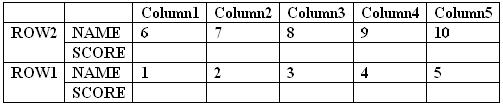
Q2) Ten students, sitting in 2 rows of 5 each, took their 500-point final exam in advanced calculus. The students’ scores were all multiples of ten with no two of then receiving the same score. Use the following clues and the professor’s seating chart below to determine which student sat in which seats and the test score each student earned.

1. Hugh sat next to both Ida and to the student making 82%, which was the lowest grade on the test.
2. George and the student scoring 470 sat in diagonally opposite corner seats.
3. Chuck sat somewhere between Bill and the student scoring 410, although these 3 students are not necessarily in the same row. Similarly, Ann sat somewhere between Eve and the student scoring 490.
4. The sum of the scores of the students sitting in the first column is 880.
5. Jerry’s score was 10 points better than Dolly’s but 50 points less than Frank’s.
6. The average score of those in the Column 2 is the same as that of those in Column 4, but is 5 points less than the average of those in Column 3.
7. The student with the lowest score of those in the first row sat directly in the front of the student with the highest score of those in the second row.
8. The average test score of those in the first row is 46 points higher than the average of those in the second row.

Saturday, December 10, 2005

A Discussion on Stack ADT

"Stack" - is a very basic and neatly designed Abstract Data Type that is available to us. If we have to describe the structure of the STACK ADT, it can be simply said as a ADT which follows LIFO queue servicing model. It is very much similar to a Stack of Plates. When you want to add a plate to the Stack, you add the new plate to the top end of the Stack and if you want to remove a plate from the stack, you do it the same way i.e., remove the plate from the top end of the stack.

Advantage :
It is easy to implement.
The accessor methods ( PUSH & POP) are much simpler than the accessor methods of most other ADTs.
Easy to handle the data using Stack ADT.

Implementation Details :
Stack are usually implemented with Arrays. Arrays are the most primitive Data type that is usually available with any programming language. In Stack, we simply abstract the access to the array and restrict the access only to the last element ( top most element of the stack). By using array, we can implement the basic accessor methods i.e., PUSH & POP in O(1) time. We simply store the last element's index and access is using Array indexing. Hence it is accessible in Constant time. ie., O(1).

Assume Stack is implemented using an array Stack[] of size N and the index of the top most element in the Stack is stored in "top". The parameter "o" refers to the generic Object which can be anything from int to float.

Other supporting methods ( can be implemented easily for any array):
size() - returns the current size of the Stack.
isEmpty() - returns boolean value telling whether the Stack is empty or not.

PUSH(o) :
if Stack.size() == N then
throw stackFullError
Else
top <- top + 1
Stack[top] <- o

POP():
if Stack.isEmpty() then
throw stackEmptyError
Else
o <- Stack[top]
Stack[top] <- null
top <- top - 1
return o


The problem in the above implementation is the array size should be initialized at the beginning. Thus if the stack size turns out to be small, space is wasted and if stack size turns out to be large, then the stack can crash when array indexing exceeds the upper limit.

Solution:
Thus it is better to use Linked List in place of Array when space efficiency is our main concern.
Traditionally, we have a link to the head of the Linked List and we update the elements at the end opposite to the head of the Linked list. But the problem in using Linked List is the accessor methods turns out to be O(t) where t refers to the current size of the stack. Here, a reference to the Head of the Linked List is not absolutely necessary at all. The main aspect of Stack is they allow access only at one end of the ADT. Hence holding a pointer to the top most end of the stack should improve the accessor method's running time. Thus, we can simply implement the linked list in reverse order and hold pointer to the head.

Linked List Structure:

topmost -> n-1 -> n-2 -> ........ -> bottommost

Here by holding a pointer to the topmost element, we can implement PUSH & POP methods in O(1) time. Thus Stack turns out to be an efficient ADT even while using Linked List. Hence using a reverse order of storage in Linked List, we get space efficient and time efficient Stack ADT.

Tuesday, November 22, 2005

SQL Server: minus operator

Lets see some Database stuff.

Minus operator in Oracle: Consider two tables T1 and T2. Hence T1-T2 or T1[minus]T2 means return all rows in T1 that are NOT in T2.

Consider the tables as,
T1
Col1.........Col2
1...............A
2...............B
3...............C

T2
Col1..........Col2
1................A
2................B
3................X

As per Oracle,
Query: Select * from T1 minus Select * from T2
Result: 3.........C
Query:Select * from T2 minus Select * from T1
Result: 3.........X

Minus operator in SQL Server: But unfortunately SQL Server does not support this operator. But here is work around to make it simulate in SQL Server.
Query:
Select * from T1 where
IsNull(cast(Col1 as varchar, '')) +
IsNull(cast(Col2 as varchar, ''))
Not in
(Select IsNull(cast(Col1 as varchar, '')) +
IsNull(cast(Col2 as varchar, '')) from T2)

Result: 3.......C

Explanation: The "In" operator works as per syntax. But it could be applied only to single column. Hence the basic idea is to concatenate all the columns to a single column. Similarly with the other table columns are also concatenated to a single column. Now using the "In" operator they are filtered out. The "cast" is for converting column values to varchar, the "IsNull" to remove NULL values. This is one such idea of doing it.

Monday, November 21, 2005

Java: String & String Buffer usage.

While performing any string manipulations like searching for a character in a string and replacing by a given character, our natural choice would be to use String. But, this is not advisable.

This is because when we make any modification to the existing string, a new string object is created by the JVM. Hence for making four replacement in a string, four new string object would be created and hence a total of five string object would be present in place of one string object. So the better option is to use String Buffer. String buffer doesn't create new objects, instead makes the modification in the original string. Hence string buffer are more space efficient than string.

Strings in Java are stored in "String Buffer pool" maintained by JVM. This is the region each time a new string gets created. The string buffer is created and manuplated in the Heap like any other object.

Example:

{
String strFirstName, strLastName;
strFirstName = "Rakesh";
strFirstName = "Sharma";
strLastName = "Rakesh";
}

What happens in the String Buffer pool is, strFirstName will point to a location contaning the value "Rakesh". Then it points to a new location contaning "Sharma". when strLastName is assigned a value "Rakesh", no new memory location is created for storing instead it points to "Rakesh" which was created earlier.

regex package in java & handling wild card characters

Java offers you regex package to handle the regular expression. Suppose you take a string from the user and search for the string in the database using regular expression, you may have some problems in implementing wildcard characters handling. Regex package can generate regular expression for all the string that you pass. But wildcard character * in regular expression has a different meaning from our normal interpretation.

Take for an example,

The search string entered : a*b

In regular expression, a*b means any number of 'a's followed by a 'b'.
so in this case, valid match could be

ab, aab, aaab, (a)-n times followed by (b).

but what user wants could be a followed by any character, any number of times and finally a 'b'. To convert this search string in to a proper format to be passed to the regex method is to replace '*' with a '.*' . And similarly for '?', it should be replaced by '.'

So, a search string "a*b"( in our normal sense, meaning 'a' followed by any character any number of times, followed by 'b') should be modified as "a.*b" before passing on to the regex package. If this search string is passed to the regex and asked to generate a regular expression from it, then we can get this regular expression to do the normal wildcard operation.

Similarly, a search string "a?b" ( meaning 'a' followed by any one character, followed by 'b') should be converted into "a.b" before passing on to the regex for generating the regular expression.

File Organisation in Web Applications

In Web Applications, you may have different kind of files like Servlet files ( .java files which define all the servlet methods), JSP Pages ( used for presentation purpose i.e., displaying information. It can be used in place of HTML to provide dynamic content unlike HTML's static content by embedding java commands in the JSP page), .properties file which contain the configuration details as (key,value) pair and also other .java files (which contains the business logic implemented in them).

To make the file organisation to be clean, we can follow seperate out presentation files and the business logic files and make them to be independent of each other. We should not include any business logic like reading from a database, writing to database or any other action in JSP files. Though it is always possible to accomodate any kind of java command and operation in jsp file, it is not advisable to do so. In Industry practice, the JSP Page and the .java file which has the business logic may be developed by two different person. JSP professional needs no knowledge of java. So it is better to avoid embedding complex business logic in jsp files. Minimal amount of java commands in jsp page for the purpose of presentation is acceptable.

So we can have all the business operations in .java file as a separate package and call them in the servlet files as and when needed. All the constants used in the application can be added in a .java file and could be declared as interface. We can make all the files that needs to use these constants to implement that interface for efficient space management. Moreover it is better to handle all the exceptions in any one particular level. Best practice is to handle the exceptions in the .java files which includes the business logic, instead of handling them in the servlet files. This method provides a greater amount of independence between the servlet files and the .java files.

All the configuration information could be stored in the .properties file and could be read from that file. It is easy to change any configuration in this method. Only the key,value pair in the .properties file needs to be changed to implement any change in the configuration.

Example:

Problem Description :
You are asked to create a simple web application which fetches the data from the Backend database and display all the entries on the Jsp page.

Possible file organisation:

Now, your file organisation can be like,

rootdir/
rootdir/web/
rootdir/web/jsps/
rootdir/web/jsps/"anyjspfile".jsp
rootdir/web/WEB-INF/lib/
rootdir/web/WEB-INF/lib/"anylibfile".jar
rootdir/web/WEB-INF/classes/
rootdir/web/WEB-INF/classes/"anyconfigurationfile".properties
rootdir/src/"package1"/
rootdir/src/"package1"/"any servlet/portlet file".java
rootdir/src/"package2"/
rootdir/src/"package2"/"any business logic implementation file".java

Here you "jsps" directory holds all your jsp files. You can have
rootdir/web/jsps/help/ directory to hold your help.jsp files.

Then you can organise all your servlet/portlet files under one package.

And all your business logic implementation files i.e., here it could be the .java file that implements the jdbc connectivity methods to connect to the database, retrieve the data and all other database operations, could be placed in another package.

This organisation makes the package2 to be used independently in any other application when needed. You can import this package where ever needed.

Moreover, all the constants used in the web application can be added to an interface, may be, called "applicationname"Constants.java and this file can be implemented by which ever file, which needs to use these constants.

If you want to create a package out of this application, you can add the following files and directories.
rootdir/build.xml
rootdir/proto/
rootdir/proto/"packagename".snippet

Using "ant" command, you can "build" the application using the build.xml file. Then snippet file contains all the files that has to be added into the package and also the file access permission for each of them. You can write script to read the snippet file and create package accordingly!

This is one possible method, but in Industry practice this method is widely used. If you feel this orientation is wrong, please correct me!

Null Pointer Exception

Right now, I'm doing my project in SUN Microsystems. An interesting thing that i learned here with respect to null pointer exception in Java language is as follows:

When you encounter a NULL pointer exception ( Null pointer exception is the exception that is thrown by the JVM when you perform some operation on an object which is null or calling some method on the object that is null), you should not try to handle that exception i.e., DONT try ...catch the null pointer exception. It is nothing but patching the problem and it isin't the right way. You should try to avoid performing any operation on null object.

Eg:

object.method();

Assume this statement generates a null pointer exception.

Wrong method :

try {
object.method();
} catch ( Exception Ex) {
// handle the exception
}

Correct Method :

if ( object != null) {
object.method();
}

C++: What is Slicing problem?

This makes a clear explanation!

CPlusPlus Gems

Friday, November 18, 2005

Disclaimer

To Err is human! Unintentionally, we might make some mistakes in the informations given here. We are taking all the precautions possible to avoid any such mistakes. We regret anything of that sort, if at all it exists. You are free to correct our mistakes and provide us with valuable feedback. Thanks!